Cashier System in Malaysia: How to Run Promotions and Discounts Without Losing Margin
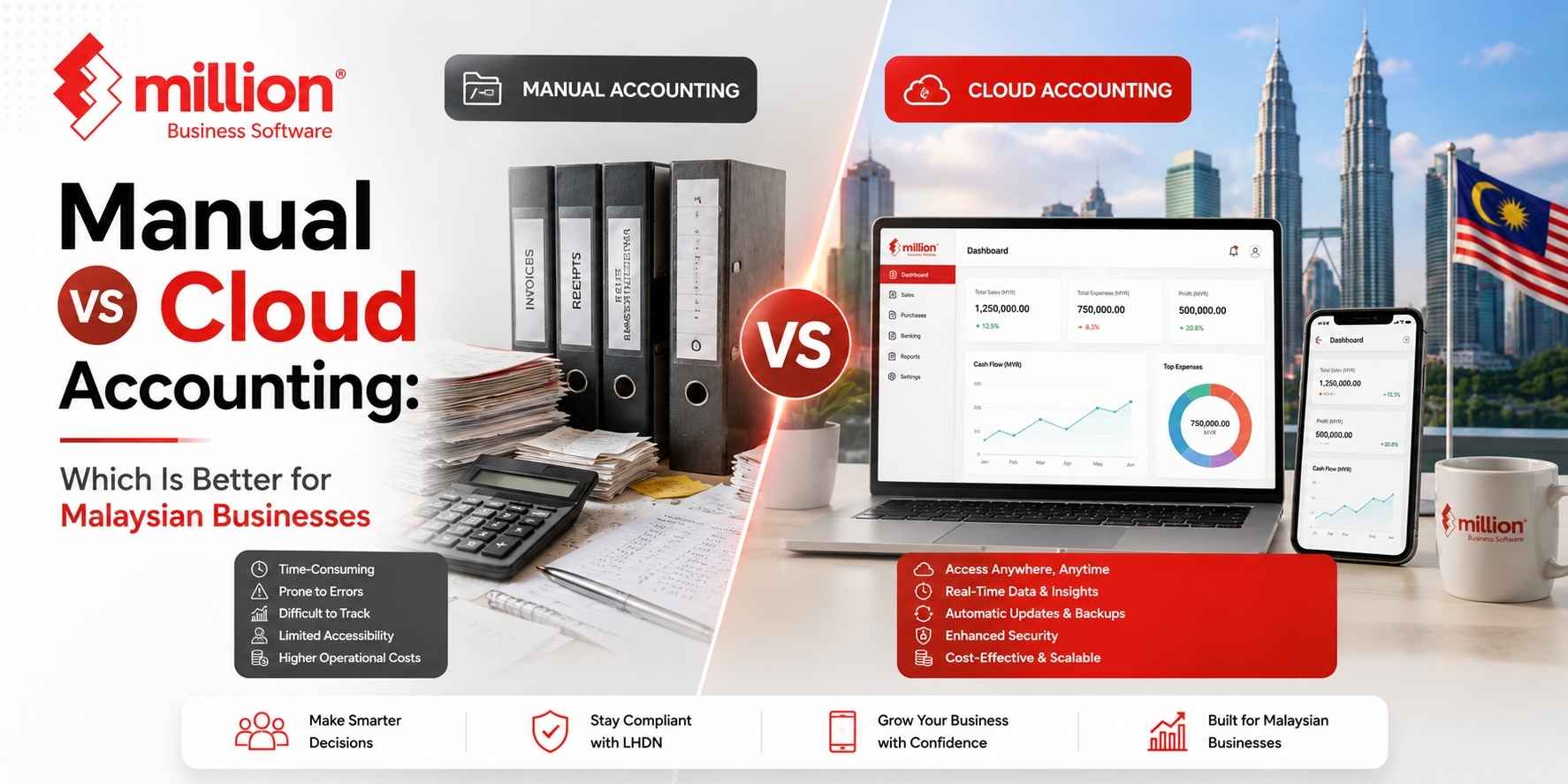
Managing business finances used to mean ledgers, paper receipts, calculators and spreadsheets. Today, Malaysian businesses have more choices. They can continue using manual accounting methods or adopt cloud-based accounting systems.
But which option is actually better?
The answer depends on your business size, the number of transactions you handle, how many people need access to financial information and how quickly you need business insights.
Manual accounting vs cloud accounting is essentially a comparison between traditional, often hands-on financial record-keeping and internet-based systems that provide greater accessibility and automation. Both methods can work, but they support businesses in very different ways.
For small businesses with simple transactions, manual methods may still feel manageable. However, as a business grows, recording transactions, organising documents and preparing reports manually can become increasingly time-consuming.
In this guide, we compare manual and cloud accounting to help Malaysian business owners understand the strengths, limitations and best use cases of each approach.
What Is Manual Accounting?
Manual accounting is the process of recording, organising and managing financial transactions by hand or through basic tools such as paper ledgers and spreadsheets. The business owner or accountant is responsible for entering transactions, checking calculations and maintaining financial records.
Manual accounting may involve:
- Paper-based ledgers
- Excel spreadsheets
- Physical invoices and receipts
- Manual calculations
- Manual bank reconciliation
- Filing documents physically
For many small businesses, this method is familiar and easy to start with. A business owner can create a spreadsheet and begin recording income and expenses without purchasing specialised software.
However, the simplicity of manual accounting can become a challenge when the business starts growing.
A Simple Example
Imagine a small business that records only a few transactions every week. Using a spreadsheet may be manageable.
Now imagine the same business grows and starts handling:
- Hundreds of customer invoices
- Multiple suppliers
- Employee expenses
- Inventory
- Several business locations
- Regular financial reporting
At this stage, manually updating every transaction can take significant time and increase the possibility of errors.
What Is Cloud Accounting?
Cloud accounting is a method of managing financial information through software that stores and processes data online. Users can typically access the system through an internet connection rather than relying on a single physical ledger or computer.
Cloud accounting systems commonly provide features such as:
- Online financial access
- Multi-user collaboration
- Automated calculations
- Digital invoicing
- Expense tracking
- Financial reporting
- Data backup
- Software updates
The main advantage is accessibility. Depending on the software, authorised users may be able to access the same financial information from different locations.
Cloud accounting has become increasingly relevant for businesses that want faster access to financial data and easier collaboration between business owners, finance teams and accountants. Malaysian SMEs are also operating in an environment where digital financial workflows and e-Invoice readiness have become increasingly important. LHDN continues to publish and update official guidance for Malaysia’s e-Invoice implementation.
Manual vs Cloud Accounting: Key Differences
1. Accessibility
Manual Accounting
Manual accounting records are often stored in physical documents, spreadsheets or files on a particular computer.
This means access may be limited to:
- The office
- A specific computer
- The person responsible for maintaining the records
If the business owner needs information while travelling, someone may need to send files manually.
Cloud Accounting
Cloud accounting is designed to make financial information more accessible through an internet connection.
Authorised users can potentially work with the same information from different locations, making collaboration easier.
Winner: Cloud accounting for accessibility.
2. Accuracy and Human Error
Manual Accounting
Manual systems depend heavily on people entering information correctly.
Common problems can include:
- Typing errors
- Incorrect calculations
- Duplicate entries
- Missing transactions
- Outdated spreadsheets
The more transactions a business handles, the more difficult it becomes to identify every mistake.
Cloud Accounting
Accounting software can automate certain calculations and processes, reducing repetitive manual work.
However, cloud accounting does not completely eliminate errors. Incorrect information entered into a system can still produce incorrect reports.
The advantage is that automation can reduce the number of repetitive calculations that employees need to perform manually.
Winner: Cloud accounting for reducing repetitive manual errors.
3. Cost
Cost is not always as straightforward as it appears.
Manual Accounting
Manual accounting may appear cheaper initially because businesses can use:
- Paper records
- Basic spreadsheets
- Existing office computers
However, business owners should also consider hidden costs such as:
- Employee time
- Repeated data entry
- Error correction
- Physical storage
- Lost documents
- Time spent preparing reports
Cloud Accounting
Cloud accounting usually involves software-related costs, which may include subscriptions, implementation or training.
The potential benefit is that automation and easier reporting may save time as the business grows.
The real question is not simply, “Which system costs less?” It is, “Which system provides better value for the amount of time and work my business invests?”
4. Financial Reporting
Manual Accounting
Preparing financial reports manually can take time.
The accountant or business owner may need to:
- Collect transactions.
- Update records.
- Check calculations.
- Reconcile information.
- Prepare the final report.
This can mean that business decisions are based on older information.
Cloud Accounting
Cloud accounting systems can help businesses generate financial reports more quickly, depending on the features and quality of the data entered.
This may help business owners monitor:
- Revenue
- Expenses
- Outstanding payments
- Cash flow
- Profitability
Winner: Cloud accounting for faster access to financial reporting.
5. Collaboration
Manual Accounting
Collaboration can be difficult when multiple people need access to the same financial records.
For example:
- The business owner needs the latest report.
- The accountant needs transaction details.
- The finance employee is updating the spreadsheet.
Multiple versions of the same file can create confusion.
Cloud Accounting
Cloud-based systems are generally better suited to collaborative workflows because authorised users can work with a shared system.
This can reduce the need to repeatedly send spreadsheets between different people.
Winner: Cloud accounting for collaboration.
6. Data Backup and Security
Manual Accounting
Manual systems require businesses to manage their own backups.
Paper records can be:
- Lost
- Damaged
- Misplaced
Computer files can also be affected by:
- Hardware failure
- Accidental deletion
- Poor backup practices
Cloud Accounting
Cloud accounting providers generally offer digital storage and backup systems. However, businesses should still evaluate a provider carefully.
Important questions include:
- How is data protected?
- Who can access the system?
- What user permissions are available?
- How are backups managed?
- Can the business export its financial data?
There is no accounting system that is automatically secure simply because it is manual or cloud-based. Good security also depends on user practices, access controls and the provider’s systems.
7. Scalability
A system that works for a very small business may not work efficiently for a growing business.
Manual Accounting
Manual systems may be suitable when:
- Transactions are limited
- The business is very small
- One person manages the records
- Reporting requirements are simple
However, as transaction volume increases, manual work can increase rapidly.
Cloud Accounting
Cloud accounting systems are generally designed to support growing workloads and more complex collaboration.
This can be useful when a business adds:
- More employees
- More customers
- More suppliers
- More transactions
- More locations
Winner: Cloud accounting for scalability.
Manual vs Cloud Accounting Comparison Table
| Feature | Manual Accounting | Cloud Accounting |
| Accessibility | Usually location or device dependent | Accessible online, depending on system access |
| Data Entry | Primarily manual | Can support automation |
| Reporting | Often takes longer | Can provide faster reporting |
| Collaboration | More difficult with multiple users | Better suited for shared access |
| Backup | Business manages backups | Digital backup systems may be provided |
| Scalability | Can become difficult as volume grows | Generally easier to scale |
| Updates | Manual processes and maintenance | Software updates may be managed by provider |
| Initial Simplicity | Easy for very small operations | Requires software selection and onboarding |
Is Manual Accounting Still Suitable for Small Businesses?
Yes. Manual accounting is not automatically wrong or outdated.
It may still be suitable for businesses that:
- Have very few transactions
- Operate from one location
- Have simple financial requirements
- Do not require frequent reports
- Are still at an early stage
However, business owners should regularly evaluate whether the time spent on manual bookkeeping is increasing.
A useful question is:
Is my accounting system helping my business grow, or is my business spending too much time maintaining the accounting system?
When manual work starts taking significant employee time, software may become a more practical solution.
When Should a Business Move to Cloud Accounting?
A business should consider cloud accounting when its financial processes become difficult to manage manually.
Common signs include:
You Are Spending Too Much Time Updating Spreadsheets
If employees repeatedly enter the same information into multiple files, automation may help reduce unnecessary work.
You Need Faster Financial Information
Business owners often need timely information to make decisions about expenses, cash flow and business growth.
Multiple People Need Access
If the owner, accountant and finance staff regularly exchange files, a shared system may simplify collaboration.
Your Business Is Growing
More customers and suppliers usually mean more transactions and more administrative work.
You Want Better Integration
Modern accounting systems may connect with other business functions such as:
- Invoicing
- Payroll
- Stock control
- Point of sale systems
Million Software, for example, provides accounting solutions alongside invoicing, payroll, stock control and POS functions, with real-time integration available between relevant modules.
Manual Accounting vs Cloud Accounting: Which One Is Better?
Cloud accounting is generally better for businesses that need accessibility, collaboration, faster reporting and systems that can support growth. Manual accounting can still work for very small businesses with simple and limited financial activity.
However, the best choice depends on the business.
Choose manual accounting if:
- Your transactions are very limited.
- Your accounting requirements are simple.
- One person manages the books.
- You do not need frequent financial reporting.
Consider cloud accounting if:
- Your business is growing.
- Multiple people need financial access.
- You want faster reporting.
- You want to reduce repetitive manual work.
- You manage financial activities from different locations.
An Important Consideration: Cloud vs Manual Is Not the Only Choice
For many businesses, the real decision is not simply between a paper ledger and cloud software.
There are different accounting technology models, including:
- Manual bookkeeping
- Spreadsheet-based accounting
- Desktop accounting software
- Cloud accounting software
- Integrated business management systems
This is important because some Malaysian businesses may prefer locally installed accounting software instead of a fully cloud-based subscription model.
Million Software, for instance, offers accounting software with features such as multi-company transactions, general ledger, debtor and creditor management, multi-currency functions, audit trail reports and SST-ready capabilities. Million also offers licence options designed for different working environments rather than presenting cloud accounting as the only solution.
The goal should not be to choose the most fashionable technology. The goal is to choose an accounting system that matches your business operations.
How to Choose the Right Accounting System for Your Business
Before changing your accounting process, ask these questions:
1. How Many Transactions Do We Handle?
A growing transaction volume usually increases the need for automation and organised systems.
2. How Many People Need Access?
Consider whether your accountant, business owner, finance staff and managers need access to financial information.
3. What Reports Do We Need?
Identify the reports you regularly need to make business decisions.
4. Do We Need Integration?
Consider whether accounting needs to connect with:
- Invoicing
- Payroll
- Inventory
- POS
- Other business systems
5. What Is Our Long-Term Budget?
Look beyond the initial purchase price and consider:
- Training
- Support
- Maintenance
- Employee time
- Subscription costs
- Long-term ownership
6. Can the System Grow With Us?
Changing accounting systems frequently can be disruptive. It is often better to choose a system that can support your next stage of growth.
The Bottom Line
Manual accounting can still work for businesses with simple financial requirements and a small number of transactions. However, as a business grows, manual processes can require more time and increase the administrative burden.
Cloud accounting offers advantages such as accessibility, collaboration and faster reporting, making it attractive for many growing businesses. But cloud technology is not automatically the right answer for every company.
The most important decision is to move away from an accounting process that limits your business.
Whether you choose cloud accounting, desktop accounting software or another digital solution, your system should help you maintain accurate records, understand your financial position and spend less time on unnecessary administrative work.
For Malaysian businesses, it is also worth considering how the chosen accounting workflow supports local requirements such as SST and evolving e-Invoice processes. Official implementation guidance is available from LHDN.
The best accounting system is not simply the newest one. It is the one that gives your business the right balance of control, efficiency, visibility and room to grow.
Frequently Asked Questions
What is the main difference between manual and cloud accounting?
Manual accounting relies heavily on people recording and managing financial transactions through paper records, spreadsheets or locally maintained files. Cloud accounting uses online software to manage financial information and can provide easier access, collaboration and automated processes.
Is cloud accounting better than manual accounting?
Cloud accounting is generally better for businesses that need multiple-user access, faster reporting and scalability. However, very small businesses with limited transactions may still find manual methods manageable.
Is manual accounting cheaper?
Manual accounting may have lower direct software costs, but businesses should also consider the cost of employee time, repeated data entry, errors and administrative work.
Can small businesses use cloud accounting?
Yes. Many small businesses use cloud accounting because it can simplify financial record-keeping and provide easier access to business information. The right choice depends on the business’s needs and budget.
Is manual bookkeeping still relevant?
Yes. Manual bookkeeping can still be useful for businesses with simple operations and very few transactions. However, it can become increasingly time-consuming as a business grows.
Should Malaysian SMEs use accounting software?
Most growing Malaysian SMEs can benefit from accounting software because it can improve record organisation, reporting and operational efficiency. Businesses should compare features based on their specific requirements, including SST, invoicing and e-Invoice workflows where relevant.

Related posts


